Education
How we built AtomiXR with Claude and PlayCanvas
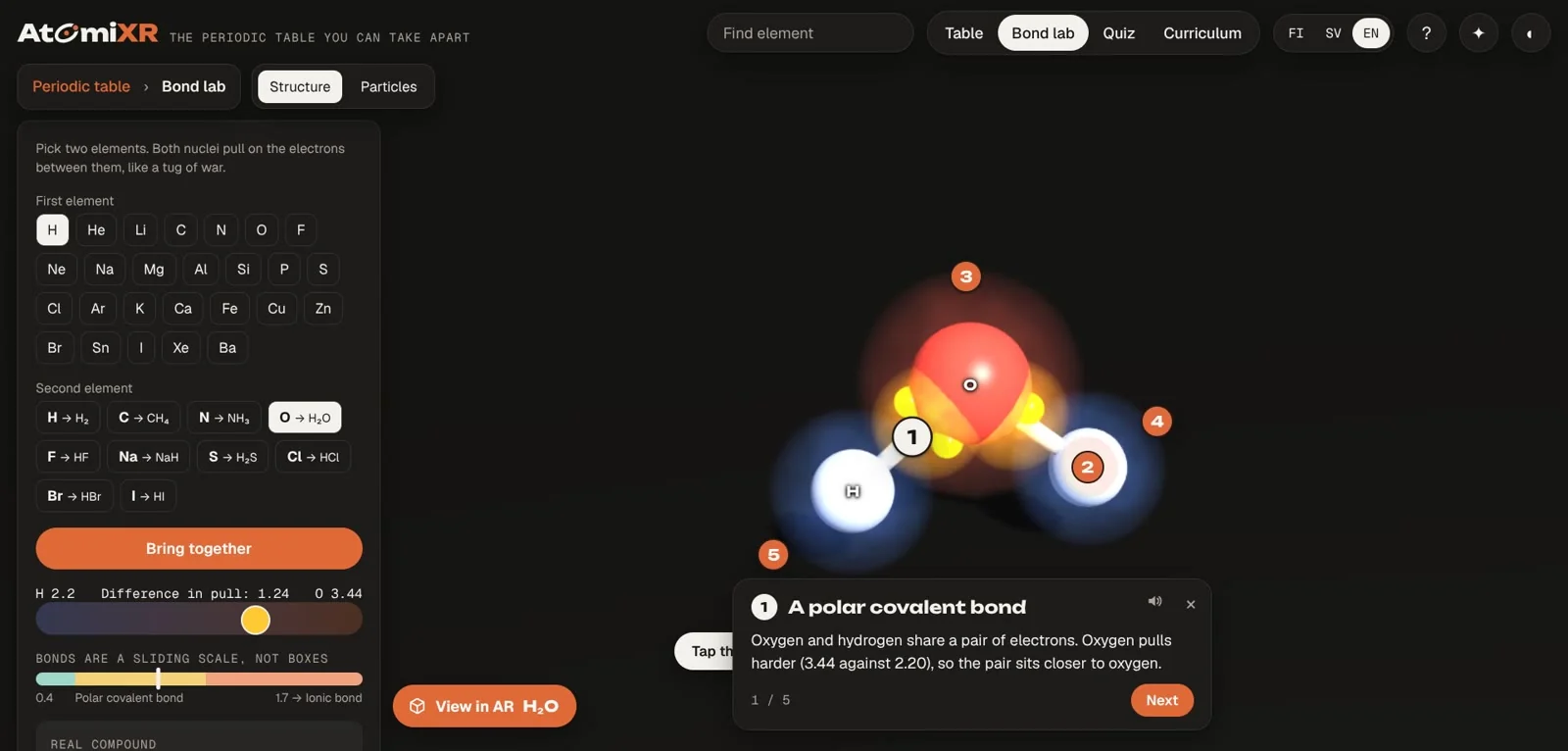
In short: AtomiXR started as a studio experiment: an interactive 3D periodic table you can take apart. We built it by talking to Claude, Anthropic's AI model, which wrote the code and published builds straight into the PlayCanvas editor. We decided what it should be, looked at every version and said what was wrong. This post describes how that worked in practice, including the parts that did not work.
What we set out to make
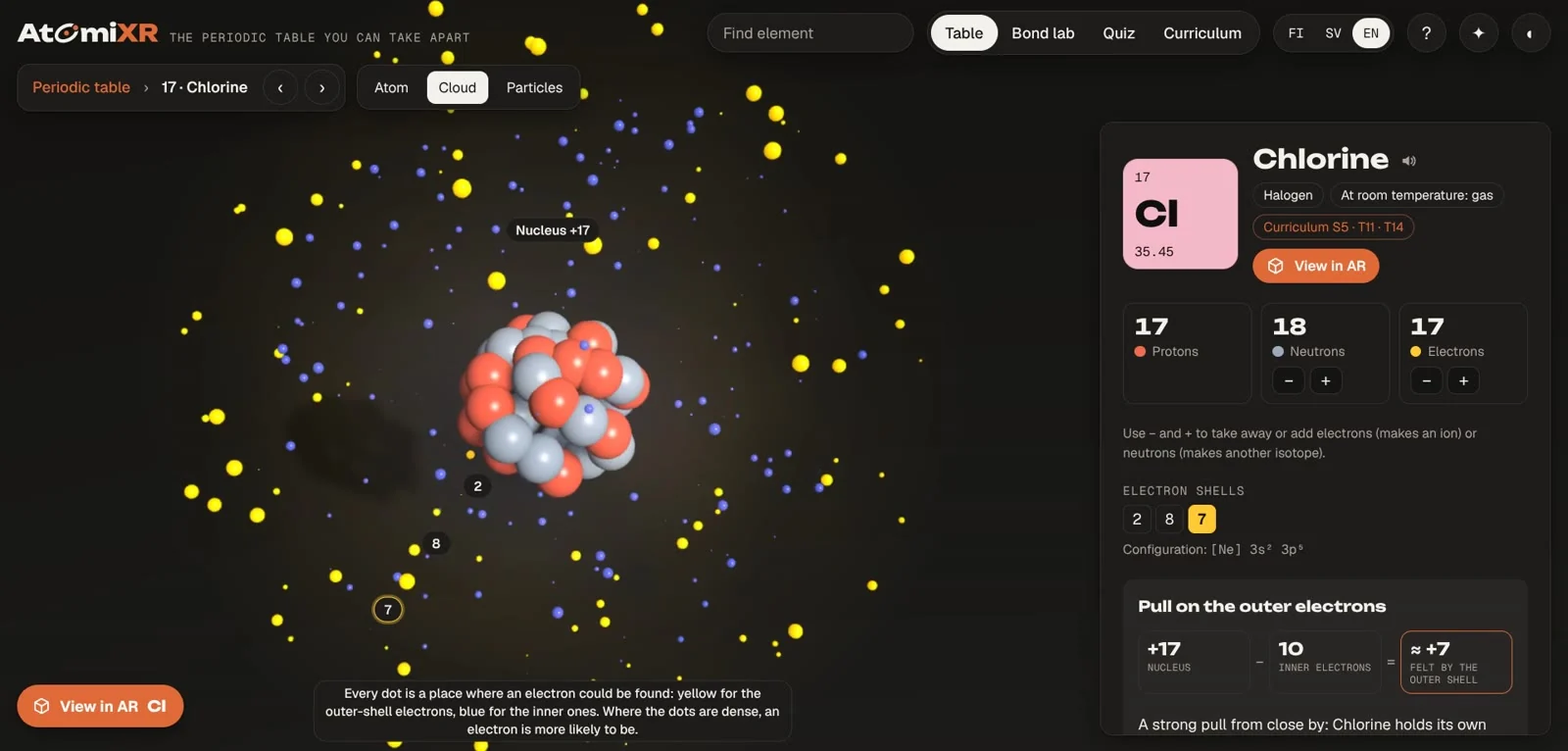
We wanted a periodic table that explains itself. Every one of the 118 elements should open as a model, two elements should combine into a real compound, and each model should say why it looks the way it does, in Finnish, Swedish and English, using Finland’s lower-secondary chemistry topics as a starting point.
That is a lot of content and a lot of small interface decisions. It is the kind of project that usually dies in the backlog of a small studio. Try the result here.
The setup
Three pieces did the work:
- Claude wrote the application code, the scripts that assemble the chemistry data, the texts in three languages and the quiz questions.
- PlayCanvas is the 3D engine and the hosting. It runs in any modern browser, with nothing to install.
- A connection between the two. Claude could upload files into our PlayCanvas project, start a build and open the result in a browser to check it. No copy and paste between tools.
A normal round looked like this. We’d describe what we wanted to change, often by voice. Sometimes we sent a screenshot; other times we brought a new feature request or an idea to try. Claude changed the code, published a build, opened it, tested the change and reported back with what it had checked and what it had not. Then we looked at it ourselves.
What the AI was good at
Breadth. Writing explanation cards for 47 compounds, each with the right bond angles, charges and melting points, in three languages, is weeks of careful, dull work for a person. Claude did it in a sitting and then checked its own output against the data.
Auditing its own work. We asked for a full audit several times: facts, interface, quiz logic. It found real mistakes. A quiz question about atom size assumed a trend that a few elements break (gallium is smaller than aluminium in the data we used). A question about the state of compounds at room temperature included hydrogen fluoride, which boils at 19.5 °C, too close to call for a pupil. Both were fixed by changing the rule, not the single question.
Shaders and effects on request. The glow on bonds, the electron cloud made of dots and the halos around ions each started with a short description. It took a few rounds of testing and tweaks to get them right.
Honest status reports. After each round we got a list of what was tested on the published build and what was only reasoned about. That helped us see what still needed checking. We’re not chemists, and there may still be mistakes in AtomiXR. If you spot one, please let us know.
Where a human had to decide
Taste. The first electron cloud was, in our words at the time, "just a blurry sphere". The fix was a design decision: draw the cloud as dots, dense where an electron is likely to be. The AI built several effects we then removed, including a bloom filter and metallic tile finishes.
What is true enough to teach. The nucleus in the atom view wobbles slightly. We asked whether any science backs that up. The answer was that it is decoration, and it was said plainly. Colouring particles by temperature turned out to confuse more than it explained, so the colour moved to the temperature slider instead.
What a pupil will actually do. In testing we started a game and then wandered into the bond lab with the game still running. No specification would have listed that. Someone had to use it and get annoyed.
The things only a device can show. A pen tablet behaved differently from a mouse. A build made too soon after an upload shipped the old file. A 3D model format was silently stripped of its materials on import. These were found by looking, not by reasoning.
What we would tell someone starting the same way
- Ask for one thing at a time, and look at it. Short rounds beat long specifications.
- Make the AI publish and test its own work. A change that has only been written is not finished.
- Ask what was not checked. The useful answer is the list of gaps.
- Keep notes outside the conversation. We kept a running project file with every decision, address and known issue. It is what lets the work continue the next day.
- Remove things. We made AtomiXR clearer by cutting effects that looked impressive but didn’t help. Often less is more.
What it is not
It is not a replacement for knowing what you want. Every good decision in AtomiXR came from someone looking at the screen and saying "that is confusing" or "I don't believe that". The AI made those decisions cheap to act on. It also has not replaced testing with real pupils and teachers, which is the next step for AtomiXR.
Questions people might ask
Did the AI write all the code? Yes, the application code was written by Claude. We directed it, reviewed every version in the browser and decided what stayed.
Which tools did you use? Claude by Anthropic, the PlayCanvas engine and editor, and a connection that lets Claude upload to and publish from the PlayCanvas project.
Is the chemistry reliable if an AI wrote it? The element data was checked against PubChem, NIST and Wikipedia, and every compound's melting and boiling point was checked one by one, with the source shown in the app under ⓘ Sources. That check found and fixed three values the AI had written from memory. The app uses the simplified school models on purpose and says so. A teacher's review of the Finnish and Swedish texts is still on our list.
Can flyAR build something like this for us? Yes. Tell us what you have in mind.
Is it free? AtomiXR is free to use for now. We might charge for some features later, but we haven’t decided yet.